
ResoPlate 1.1 · Reverb + Instrument
Two plug-ins, one price.
ResoPlate Reverb is a plate reverb that is solved, not sampled: four independent metal plates, each a true modal resonator. ResoPlate Instrument is new in 1.1: a sheet of metal you design, then strike, scrape, pluck and shake. Both come with one purchase and one license key.
One-time $59 · perpetual license · no time limit on the demo · macOS and Windows
ResoPlate Reverb demos. Each clip plays the dry recording first, then the same passage through ResoPlate. Nothing else on the signal path.
What's new in 1.1
ResoPlate 1.1 adds ResoPlate Instrument, a playable physical-modeled sheet-metal instrument (Audio Unit, VST3 and standalone). It is a free update for everyone who owns ResoPlate, on the same license key. ResoPlate Reverb is unchanged, and your 1.0 sessions open as before.
New in 1.1 · ResoPlate Instrument
A sheet of metal you can play.
Design one sheet, then strike it, scrape it, pluck it or shake it. Like the Reverb, it is solved from the physics of the metal, so changing the material, thickness or size changes how it sounds and how it rings.
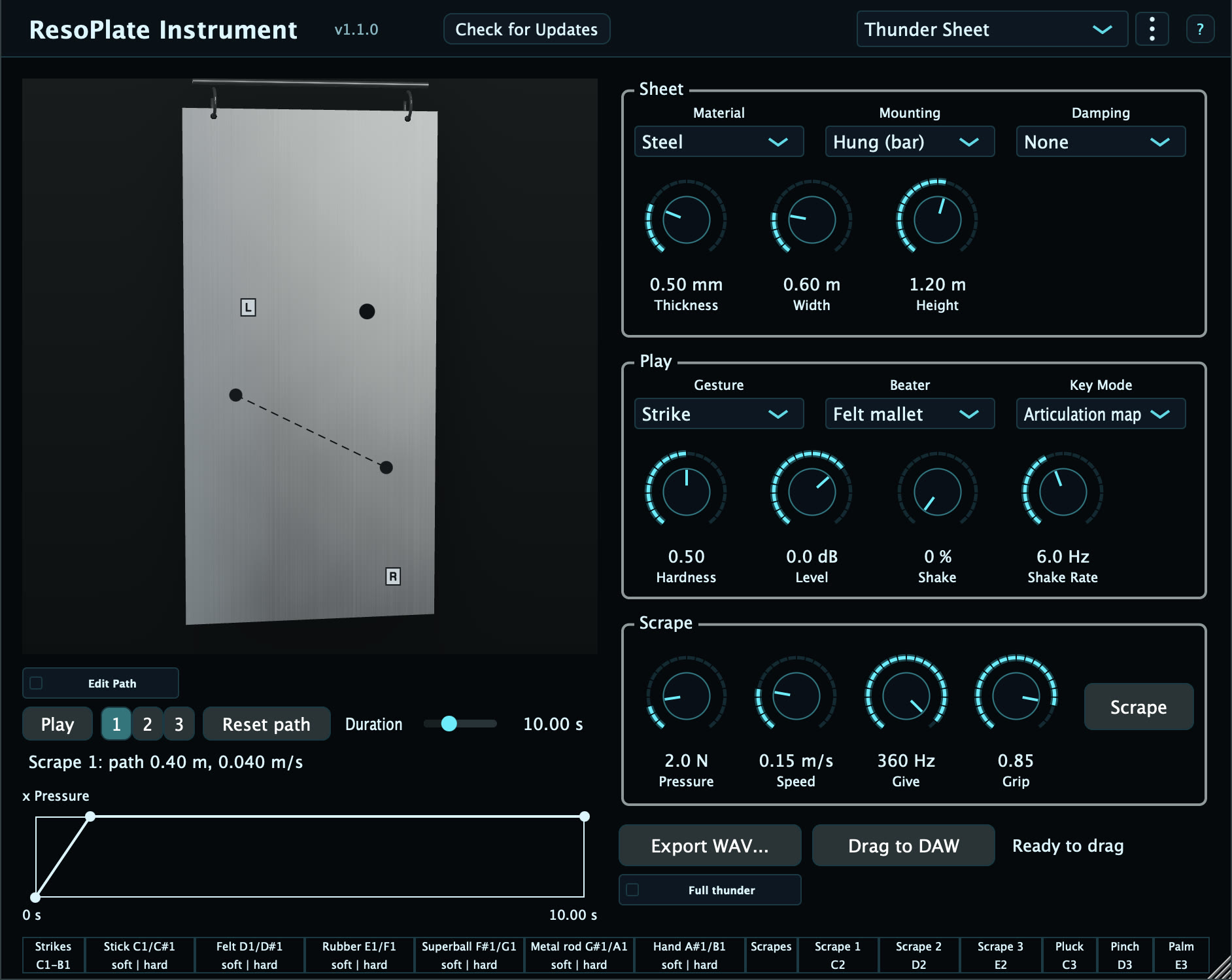
Strike, scrape, pluck, shake
Click the sheet to strike it at that point, drag to scrape, flick an edge to pluck it, or shake it like a hanging thunder sheet. A MIDI note strikes it, so you can play it from a keyboard.
Design the sheet
Pick the material, the thickness (0.3 to 3 mm) and the size (0.2 to 2.0 m each way), and how it hangs. A thin steel sheet and a thick brass plate are different instruments.
Live Shake
Shake is the thunder-sheet gesture: pitch bend drives it, and the low rumble builds into a roar as you shake harder. Live Shake plays in real time on Apple Silicon Macs running macOS 13 or later. On Windows, Intel Macs and macOS 11 or 12, Shake plays in bounces and exports only. Strikes, scrapes and plucks are live everywhere.
Scrape by hand or by wheel
Hold the Scrape button, or play the scrape with the mod wheel or aftertouch. Pressure sets how hard the tool presses, from a whisper to a screech.
Scrape Designer
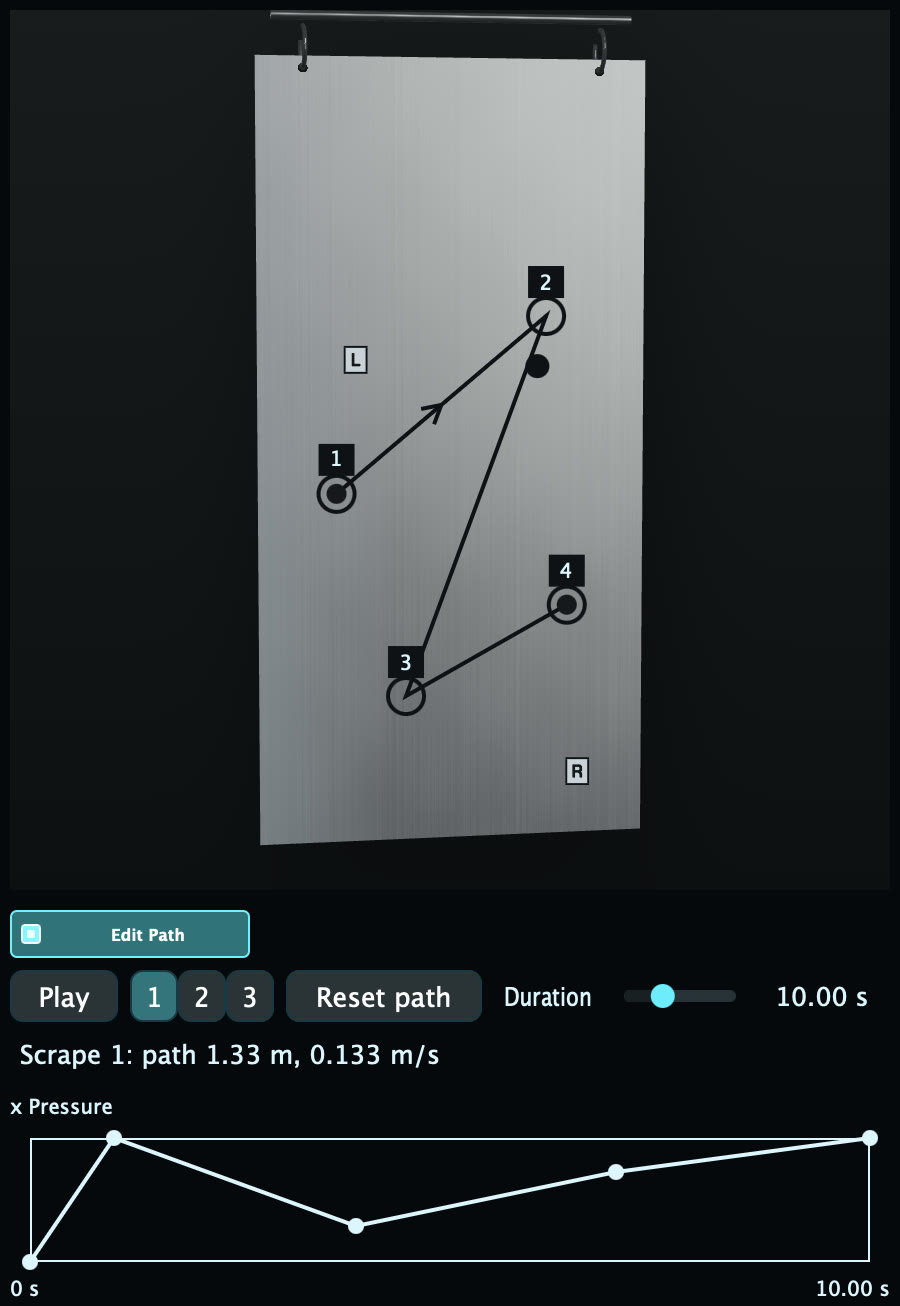
Draw a scrape path across the sheet with up to 8 points, then draw a pressure timeline for it. Play it back, trigger it from MIDI, or export it.
8 factory presets
Start from a ready-made sheet, then change anything. Presets change the sheet design, even out the level between hits, and leave your placements alone.
3D sheet view
Watch the sheet respond as you play it. Where 3D is not available, the plug-in shows the 2D sheet view instead, and the sound is the same.
Export one-shots
Render a hit to a WAV file and drag it into your session (needs a license key). With Shake on, the export is a hit and then the Shake, and Full thunder renders that Shake at its highest quality.
ResoPlate Instrument demos. Rendered by the plug-in with nothing else on the signal path. Clip levels are matched for this page.
Strikes, scrapes and plucks are playable sheet-metal sounds. The thunder-sheet sound comes from the Shake gesture.
ResoPlate Reverb
The plate reverb you already know.
Four independent metal plates from real physics. Each one is a modal resonator tuned by material and geometry, so the tail breathes and blooms like struck steel instead of replaying a fixed impulse.
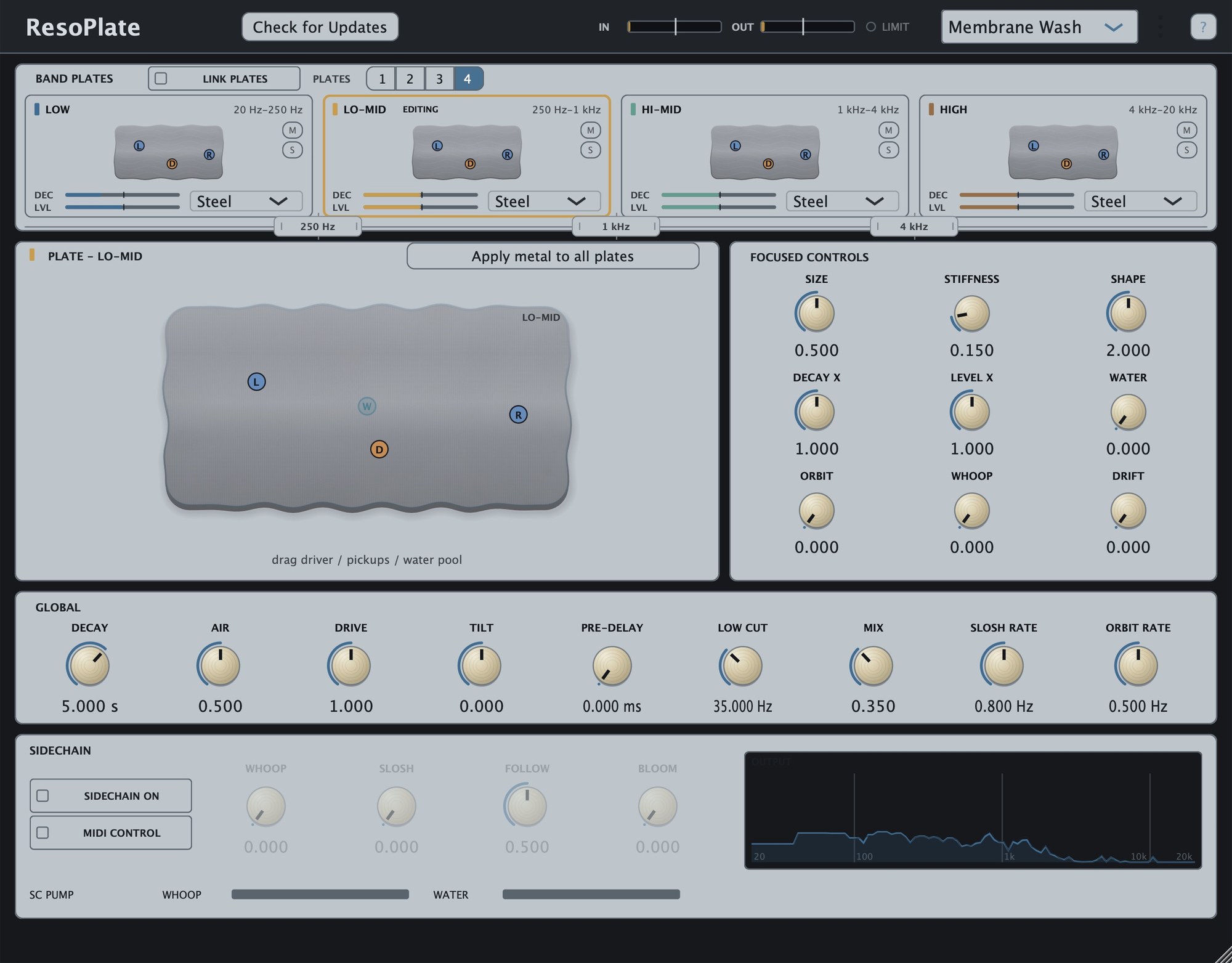
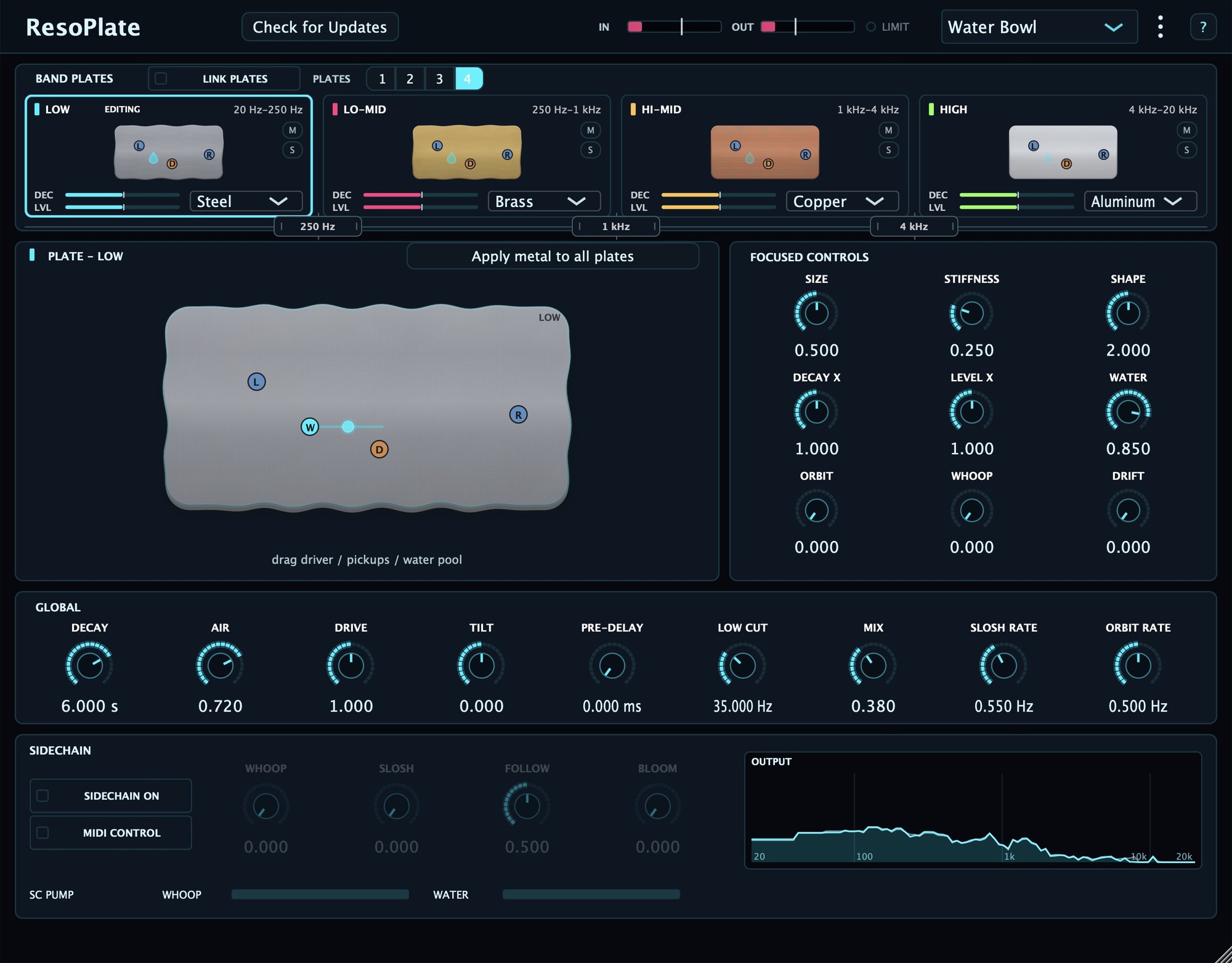
The ResoPlate editor on its default Brushed Steel skin: four band plates, a draggable plate view, focused controls, sidechain, and the live output analyzer.
Reverb · What makes it different
Four plates, real physics, live feedback.
Four independent plates
Run up to four modal plates at once, each with its own size, material, and decay. Layer them for a lush hall or detune them for a shimmering ensemble.
Modal, not convolution
Every plate is a solved modal resonator, not an impulse response. Change the material or the size and the whole mode structure retunes in real time.
Real plate materials
Choose from six metals, each with representative stiffness and loss values. Steel is the reference; the others shift the pitch and decay of the physical model toward how that alloy behaves.
Honest decay and Air
Decay is calibrated at a musical reference, and a single Air control opens up long, natural highs without the metallic ring loud chords used to bring.
Live output spectrum
A real-time analyzer shows the plate output as you play, so you can see the tail settle and shape the EQ against what you actually hear.
Playable by MIDI
Pitch bend and the mod wheel drive the plate motion, so the reverb becomes a performable, expressive voice rather than a static send.
Reacts to your mix
Feed ResoPlate a sidechain and an envelope follower steers the plate's motion, so the tail bends and breathes in time with the track instead of sitting still. Dial it in with Follow and Bloom.
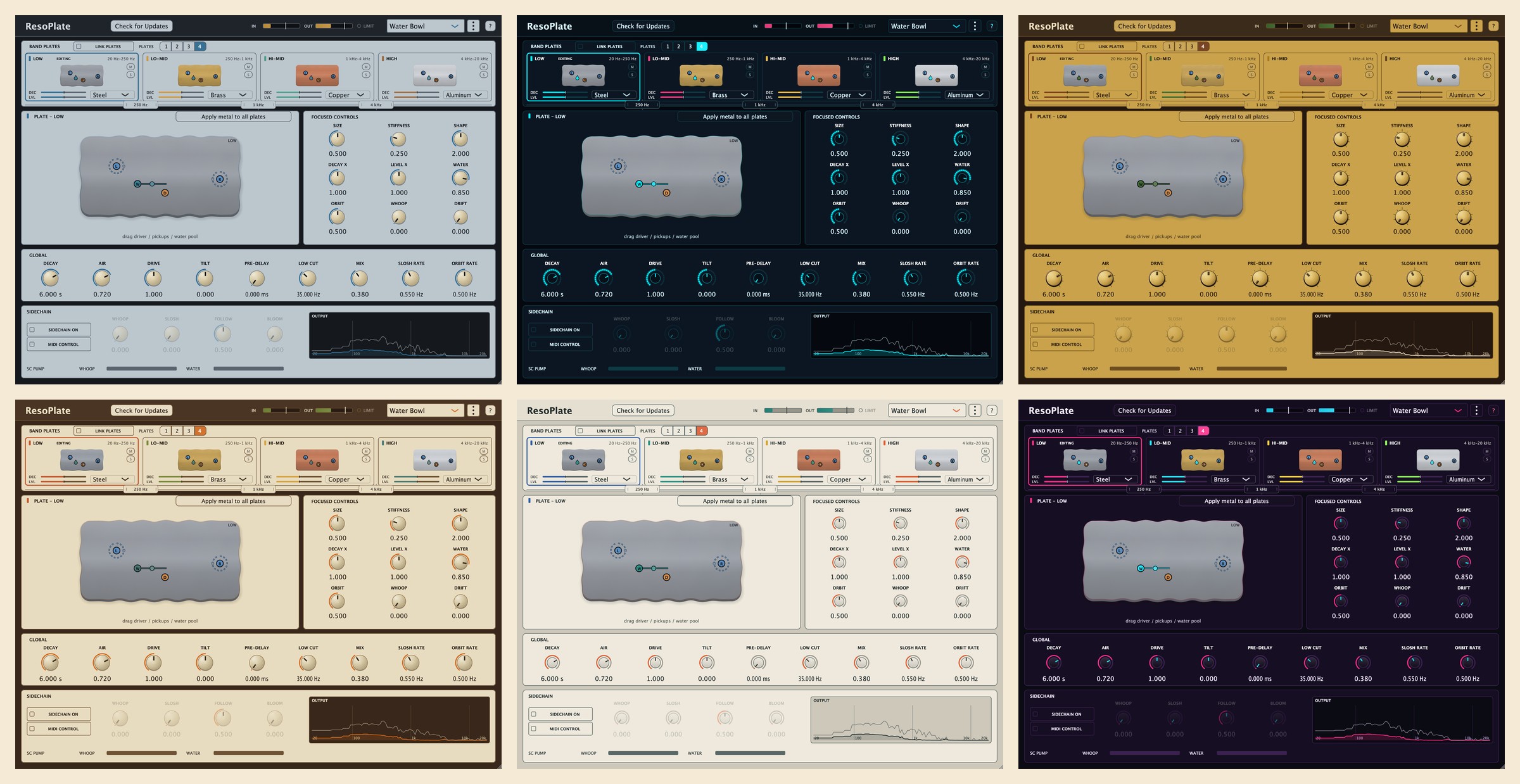
Skins
Choose your look.
Ten skins, from the default Brushed Steel to Neon Grid '86. Right-click anywhere on ResoPlate Reverb or ResoPlate Instrument to switch; the sound never changes.
The physics
A surface that answers back.
Strike a real plate and the whole sheet answers at once, its modes trading energy across the metal like ripples meeting on water. A waterphone shows the same idea: change the boundary, bend the water, and every resonance shifts.
ResoPlate solves that field in real time. Nudge the material or the size and the entire mode structure retunes, so the tail is never a fixed recording. Move across the pool to feel a surface respond.
Get ResoPlate
$59 gets you ResoPlate Reverb and ResoPlate Instrument. One-time purchase, perpetual license, every 1.x update free. Students and educators get 40 percent off the regular price at resoaudio.com/edu.
Try it free
- Both plug-ins; every feature except the Instrument's WAV export
- No time limit, take your time
- The output fades to silence for a moment (first after about 20 seconds of playing, then about every 50 seconds)
- Presets and sessions save and recall normally
One download for everyone. It runs as the demo until you enter a license key. The Mac installer puts everything in the right folders; prefer to copy the files yourself? Get the zip.
Unlock it
- ResoPlate Reverb and ResoPlate Instrument, no interruptions, ever
- macOS (AU, VST3, Standalone) and Windows (VST3, Standalone); one license covers both platforms and both plug-ins
- Every 1.x update, free; already own 1.0? The Instrument is a free update on your key
- Perpetual license, key by email
Secure checkout by Lemon Squeezy, our merchant of record. Your license key arrives by email within minutes. Paste it into the plug-in's ? panel to unlock the copy you downloaded; there's no separate paid download. 14-day refund policy.
Questions
Quick answers.
I bought 1.0, do I get the Instrument?
Yes. ResoPlate Instrument is a free update for everyone who owns ResoPlate. Install 1.1 and your existing license key unlocks both plug-ins. No new purchase and no new key.
Does Live Shake work on Windows?
Not live yet. On Windows, Shake is available when you bounce or export. Strikes, scrapes and plucks play live on both platforms.
Works in your studio
Installs clean, unlocks offline.
ResoPlate Reverb is a standard VST3 and Audio Unit plug-in, plus a standalone app. ResoPlate Instrument is an Audio Unit and VST3 instrument, plus a standalone app. The demo and the paid version are the same binary: when you buy, your license key unlocks the copy you already installed. Activation is offline, with no account and no always-on check.
System requirements
| macOS | 11 Big Sur or later, universal (Apple Silicon and Intel), notarized |
|---|---|
| Windows | Windows 10 or later, 64-bit (x64 and Arm64), signed installer |
| Formats | Reverb: AU, VST3, and Standalone (macOS); VST3 and Standalone (Windows). Instrument: AU, VST3, and Standalone (macOS); VST3 and Standalone (Windows). |
| Host | Any VST3 or AU host (Logic, Ableton Live, Reaper, Cubase, Studio One, and more) |
| Activation | Offline license key by email; no account, no always-on check |